01
uSERP · SEO Operations

Your clients, your notes.

The person closest to each account writes the monthly Week 2 check. Plan on about fifteen minutes per client so hub meetings start with current notes.
02
02 Who writes what

You write your own clients.

Ownership rule

Open the All Clients tab: every client in one list, your book in one block. Write the ones with your name in Current SEO.

The notes follow the client lead, not the tab.
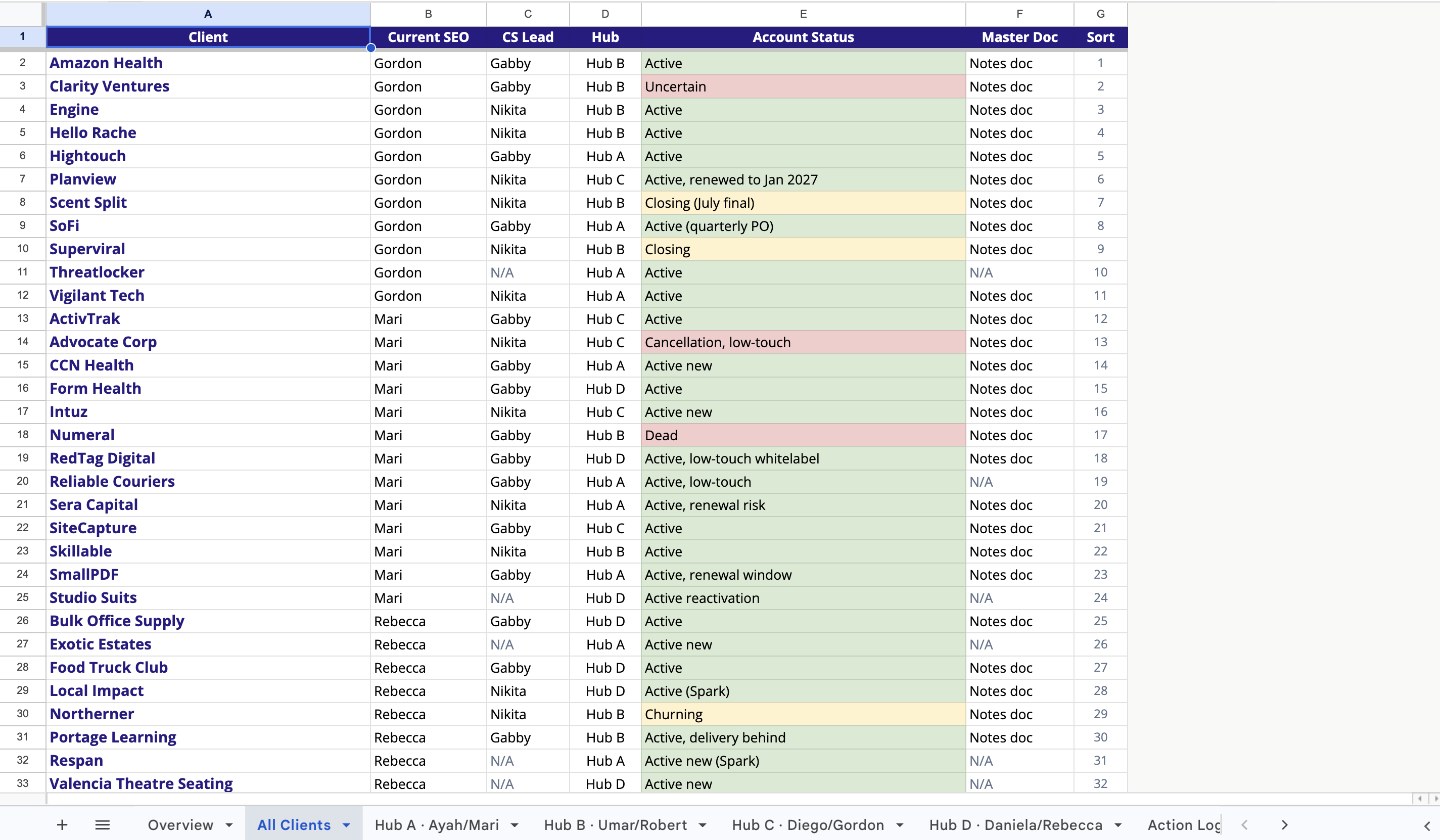
Client Hub Tracker · All Clients
The All Clients tab: every client, its SEO, hub, status, and doc link in one list Open the real tracker
03

Fifteen minutes, three moves.

Move 1 Look
  • Open the client in Client Pulse. Delivered versus target is already counted.
  • Export the CSV and count or slice it with an LLM if you prefer.
  • Scan the client's Slack channel for anything recent. (ClickUp is only for publisher, anchor, or DR detail.)
Open Client Pulse
Move 2 Write

Write five short lines in the client's hub doc, one per label.

  • Link pace
  • Anchor and target-page mix
  • Publisher quality
  • Contextual relevance
  • Client and CS signals
→ The client doc, linked from your tracker row
Move 3 Flag in the tracker
  • Set the Flag chip on your tracker row.
  • GoodWatchDiscuss
  • Add one observation in Notes.
  • Put anything that needs action in the Action Log tab.
→ Flag, Notes, then Action Log
04
04 What good looks like

Five lines, then the chip.

Client · Hub Notes
SEO You  ·  AM Specialist  ·  10/mo  ·  Status Discuss
Link pace6 of 10 July links live, 4 sourced and in final checks.
Anchor / target mixLast 3 placements all hit the homepage. Re-aim the next ones at inner target pages.
Publisher qualityDR 58 to 77, all clear the floor. One marginal niche pick worth a second look.
Contextual relevancePlacements sit in genuinely relevant articles. No forced fits this month.
Client / CS signalsClient quiet since May 2. CS re-opening contact this week.
An example month. Short, specific, and written by the person who runs the account.
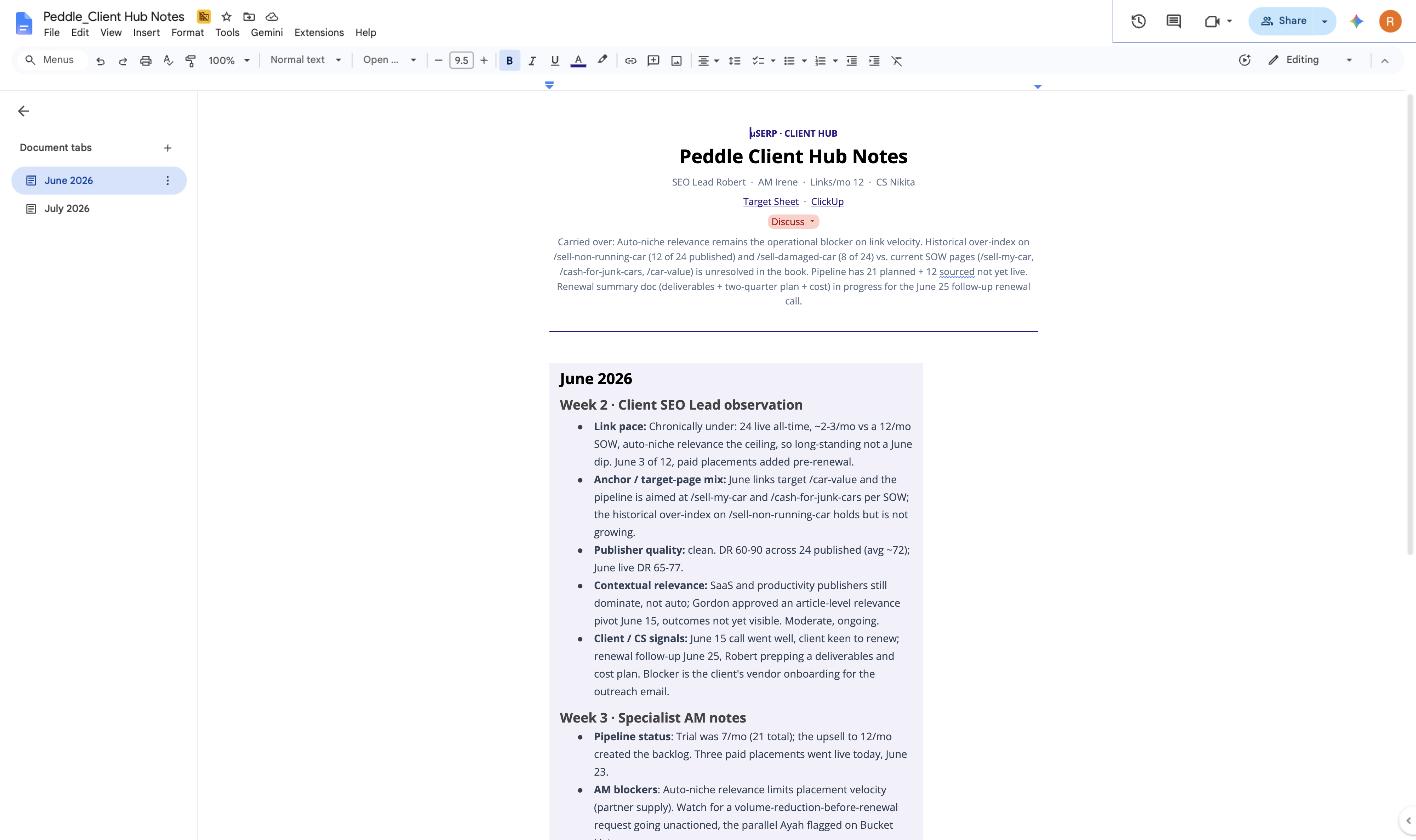
The real Peddle hub notes doc Real doc
The chip shows whether this client needs live time in the meeting.
Good
On track. The meeting can skip it.
Watch
Mention it briefly. Something to keep an eye on.
Discuss
Walk it with the account manager. It needs the room.
  • One line per label. If it needs a paragraph, it's a Discuss.
  • Open actions only in the tracker. Closed ones get deleted, the doc keeps the history.
  • A date on an action only when there's a real deadline.
  • AMs and CS can add one optional line in the doc. The SEO's five lines are definitive.
05
05 The hub meeting

Your seat in the meeting.

In the room Answer and route
  • Answer the hub team's questions from your notes.
  • Park suggestions instead of promising them live. Gordon signs off where needed; CS carries it to the client.
Knowledge in the room, approvals outside it
Before and after the call Bring angles
  • Brainstorming happens around the call, not live.
  • When an account runs short on links, bring campaign angles. The hub's AI-heavy process can turn a good idea into placements in a few clicks.
  • An angle they had not considered can unlock links that pure partnership outreach cannot.
→ The lever when supply is the bottleneck
The ramp Pace it
  • Meeting one is for listening. The hubs are still ramping; nobody opens with eight recommendations for eight clients.
  • By the second or third meeting, arrive with concrete angles for the accounts that are far behind: "have you considered these four?"
Contribution, not blame
06
06 Action Log

One home for requests and follow-ups.
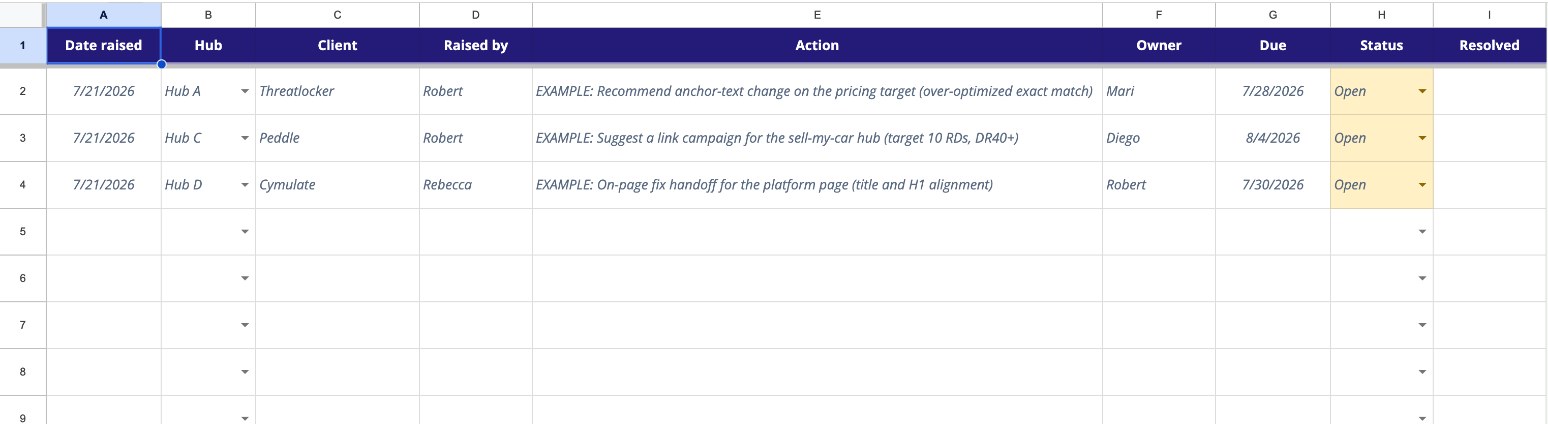
Client Hub Tracker · Action Log
Action Log tab in the Client Hub tracker Open the Action Log
What belongs here
  • Hub requests and recommendations only. Day-to-day and mid-cycle work stays in Slack.
  • Anyone in the hub can add a row. Use a status chip, and add a due date only for a real deadline.
  • Robert reviews it weekly: what is open, closed, or aging.
  • Raise it in one hub call, close it by the next.
Active clients only: wind-downs and closed-out accounts stay in the tracker but are not covered in hub meetings.
07
07 When and where

Done by Friday of Week 2.

The mechanics
  • Find your book in the All Clients tab, one block per SEO, or filter to your name.
  • Open the linked client doc from each tracker row and finish the five lines.
  • Complete notes by Friday of Week 2, before the Week 3 hub meetings.
The counting is already done

Client Pulse shows delivered versus target for every client. Use that count as your starting point.

Open Client Pulse
15 min × your bookthe complete monthly task
01 / 06
uSERP